Configuration Reference
Server Environment Variables
| Variable | Default | Required | Description |
|---|---|---|---|
DATABASE_URL |
— | Yes | PostgreSQL connection string (e.g. postgres://user:pass@host/db). |
ASSIMILATE_SECRET_KEY |
— | Yes | Secret used to derive the AES-256-GCM encryption key for repository passphrases. |
ASSIMILATE_BIND_ADDR |
0.0.0.0:8080 |
No | TCP address and port the server listens on. |
ASSIMILATE_STATIC_DIR |
./static |
No | Directory containing the compiled Vue SPA. If absent, the static file route is disabled. |
ASSIMILATE_DOCS_DIR |
./docs_html |
No | Directory containing the built MkDocs site served at /docs. If absent, the /docs route is disabled. |
SSH_AUTH_SOCK |
— | No | Path to the SSH agent socket on the server. Required for SSH agent forwarding and borg repository initialisation. |
SSH_KEY_DIR |
/app/ssh |
No | Directory where the server stores its managed Ed25519 key pair (id_ed25519 / id_ed25519.pub). |
BORG_BINARY |
borg |
No | Path to the borg executable used by the server for repository operations (init, archive listing, extraction). |
ASSIMILATE_DB_MAX_CONN |
20 |
No | Maximum number of connections in the PostgreSQL connection pool. |
ASSIMILATE_BORG_QUERY_TIMEOUT_SECS |
300 |
No | Maximum time a single borg list/borg info query may run before it is killed and the operation fails. Bounds hangs (e.g. an unreachable repository) so an import never gets stuck at "Listing archives". Increase for very large repositories over slow links. |
ASSIMILATE_BORG_LIST_STAGE_TIMEOUT_SECS |
1800 |
No | Upper bound on the total time an archive-listing stage may spend retrying borg list while the repository is locked by another operation (e.g. a running backup). Without this, lock-wait retries could keep an import stuck at "Listing archives" for up to 90 minutes. |
ASSIMILATE_SECURE_COOKIES |
true |
No | When true (default), session cookies are set with the Secure flag (requires HTTPS) and responses carry a Strict-Transport-Security header. Set to false for local development without TLS. |
AGENT_BINARY_DIR |
— | No | Directory containing arch-specific agent binaries (agent-x86_64, agent-aarch64, etc.) used by the SSH deploy feature. If unset, the server looks in /app/ (Docker) or alongside its own executable. |
VAPID_PUBLIC_KEY |
— | No | Web Push VAPID public key. Used as a fallback for browser push notifications when no key is stored in system settings. See Notifications. |
VAPID_PRIVATE_KEY |
— | No | Web Push VAPID private key. Fallback companion to VAPID_PUBLIC_KEY; keys stored via the API take precedence. |
ASSIMILATE_TRUSTED_PROXIES |
— | No | Comma-separated list of trusted proxy CIDR networks (e.g., 10.0.0.0/8,172.16.0.0/12). When set, the server respects the X-Forwarded-For header from these proxies to determine the real client IP for rate limiting. Leave empty to never trust X-Forwarded-For. |
Security
ASSIMILATE_SECRET_KEY is used to derive the encryption key that protects all repository passphrases stored in the database. If you lose or rotate this value, every encrypted passphrase becomes permanently unrecoverable. Store it in a secrets manager and never change it after initial setup.
Agent Environment Variables
| Variable / Flag | Default | Required | Description |
|---|---|---|---|
BORG_SERVER_URL / --server-url |
— | Yes | WebSocket URL of the Assimilate server (e.g. ws://server:8080 or wss://server). http:// and https:// prefixes are automatically converted to ws:// / wss://. |
BORG_AGENT_TOKEN / --token |
— | Yes | Agent authentication token generated by the server when a host is created. |
BORG_BINARY |
borg |
No | Path to the borg executable on the agent machine. |
System Settings
System settings are stored in the database and managed through the UI or the /api/system/settings endpoint.
| Setting | Default | Description |
|---|---|---|
retention_days |
7 |
Legacy setting — number of days to retain backup-run history (failed/cancelled runs without an archive) and system event log entries. Replaced by the independent settings below on first save, but still read as a fallback. |
report_retention_days |
retention_days (or 0) |
Days to keep successful/archived backup reports. Reports with an archive are pruned by this window. 0 = keep forever. |
failed_report_retention_days |
365 |
Days to keep failed/archive-less backup reports. 0 = keep forever. To clear an agent's failed reports immediately rather than waiting on this window, use Clean up failed backups in its header overflow menu. |
system_event_retention_days |
retention_days (or 90) |
Days to keep system event log entries. 0 = keep forever. |
notification_delivery_retention_days |
retention_days (or 30) |
Days to keep notification delivery-attempt history (the notification_deliveries debug/retry log). 0 = keep forever. |
run_event_retention_days |
retention_days (or 90) |
Days to keep a run's power-management event timeline (the backup_run_events table). 0 = keep forever. |
timezone |
UTC |
Timezone used for displaying timestamps in the UI and for scheduling cron-based backups (e.g., Europe/Berlin, America/New_York). |
session_idle_timeout_minutes |
480 |
Number of minutes of inactivity before a session is automatically revoked. Must be a positive integer; the idle timeout cannot currently be disabled. Does not apply to "Remember Me" sessions, which are bounded only by their 7-day absolute expiry. |
public_url |
unset | Base URL (scheme + host, e.g. https://backups.example.com) used to build absolute deep links -- such as an Activity Log link on a failed or warning backup -- in email and webhook notifications. Must use http or https and must be a bare origin -- no path, query, fragment, or embedded credentials (rejected, not stripped). The stored value is normalized to scheme://host[:port] (trailing slash and surrounding whitespace removed). Unset by default, in which case those notifications omit the link. Web Push notifications don't need this setting: the browser resolves their links against its own origin. There is no dedicated field in the Settings UI yet -- set it via PUT /api/system/settings (see Notifications). |
Database Storage
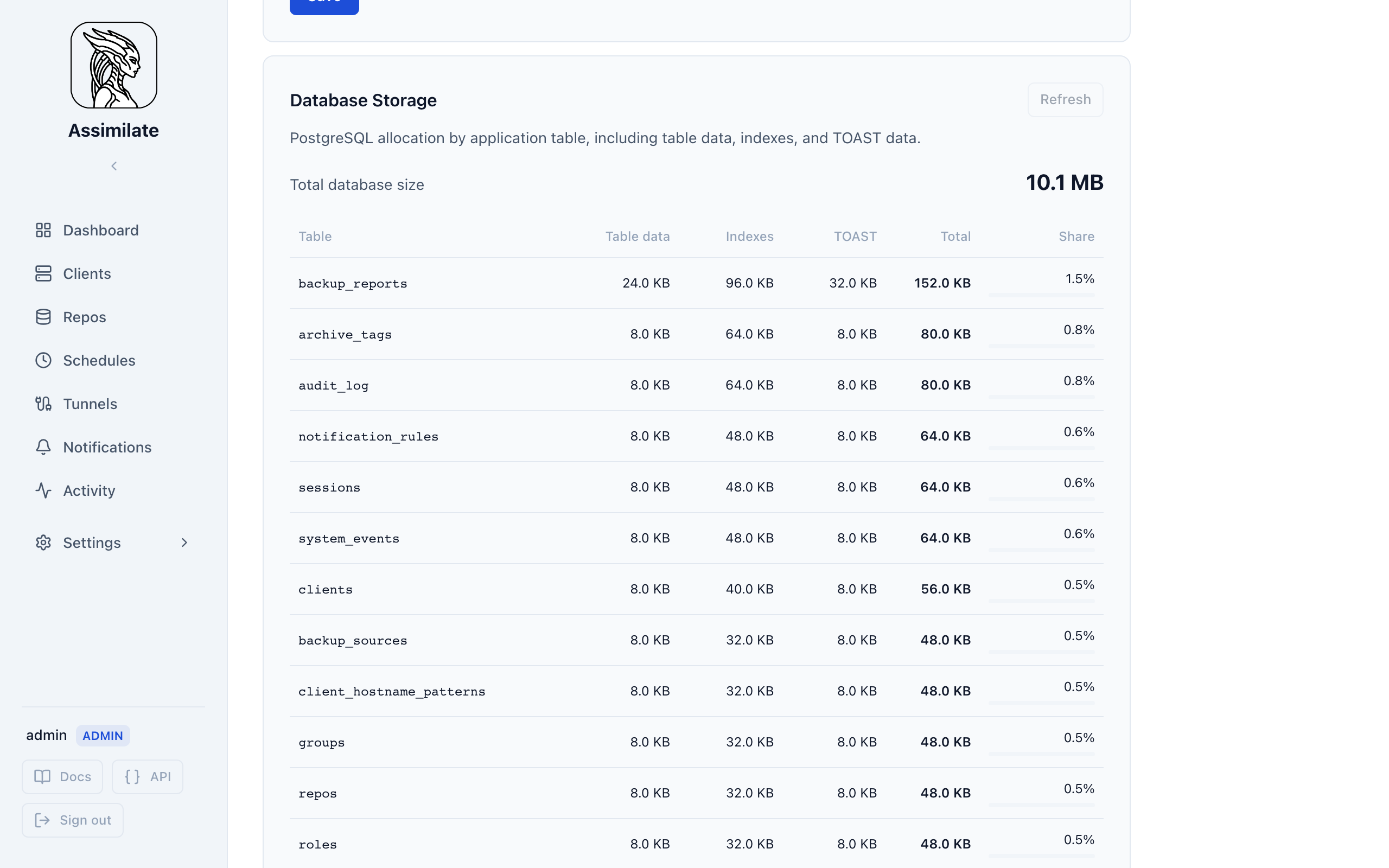
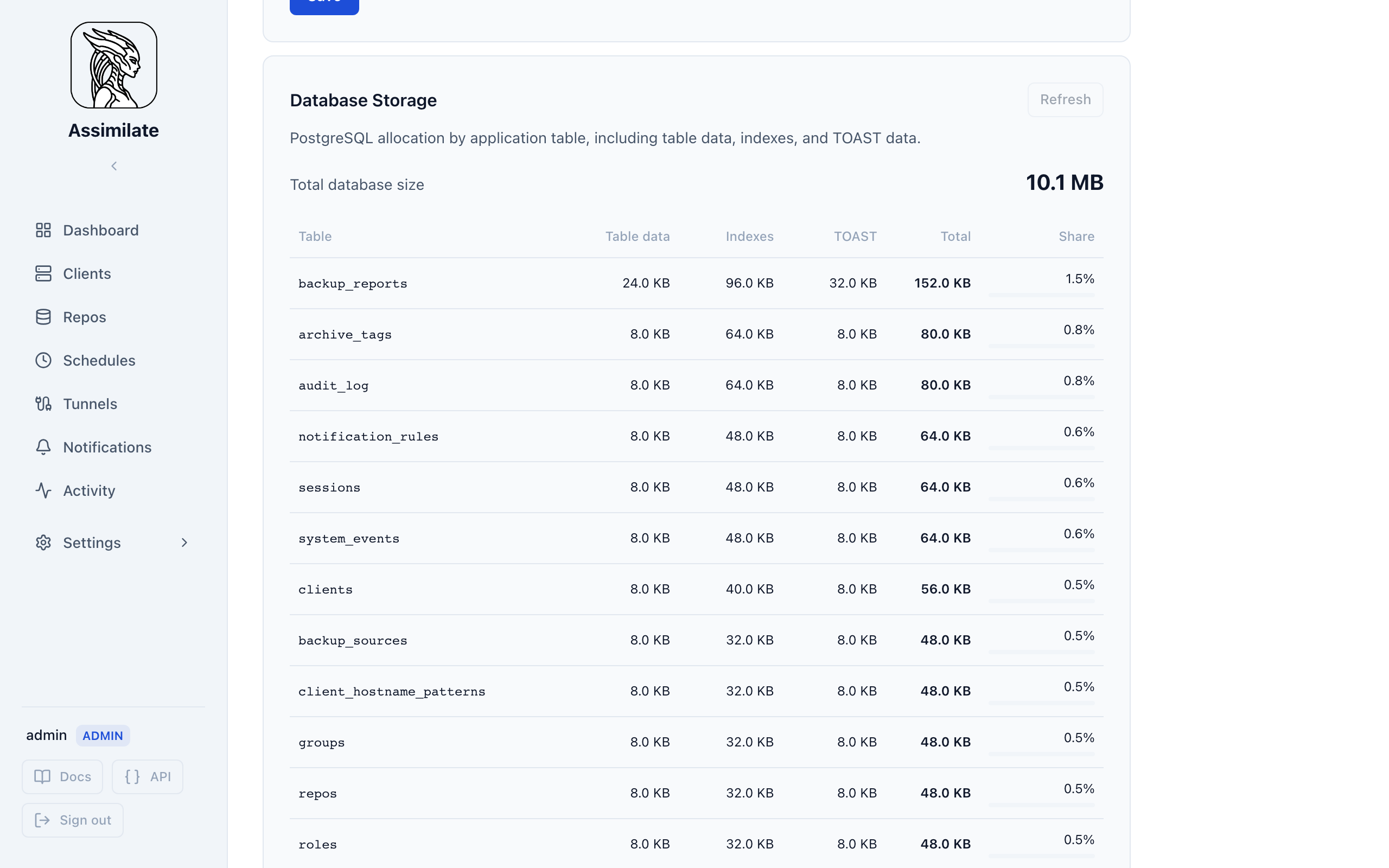
Open System → Database Storage to inspect PostgreSQL disk allocation. The table lists every application table in descending size order and separates table data, indexes, and TOAST data. Use this view to identify growth in archive indexes, backup reports, audit records, and other persisted data.
The total includes PostgreSQL system catalogs and database overhead. The Other PostgreSQL storage row accounts for allocation not owned by an application table. Deleted rows remain reusable inside PostgreSQL and do not necessarily reduce the database files on disk.
Config Export / Import
The server provides GET /api/config/export and POST /api/config/import endpoints
for portable JSON snapshots of the server configuration. This is useful for
migrating between servers or creating backups of the configuration.
Exported Entities
| Entity | Included | Notes |
|---|---|---|
| Hosts | Connection details, display name, domain, default backup paths, exclude patterns, pre/post-backup commands, file change patterns, hostname patterns | Agent authentication tokens are not exported; imported hosts receive a placeholder token. Import matches existing hosts by hostname and domain, so two hosts sharing a hostname import as distinct agents. |
| Schedules | Name, cron expression, enabled state, retention settings, backup sources, targets, exclude patterns, per-agent overrides | Only schedules with at least one valid target are imported. |
| Repositories | SSH connection details, compression, encryption mode, enabled state, sync schedule, SSH host key (of the repository's host, applied to every repository on it when imported), quota (warn/critical thresholds and actions), tags | Passphrases are never exported (see below). |
Repository Passphrase Handling
Repository passphrases are encrypted at rest with a server-specific AES-256-GCM key and are never included in the export. After importing a config containing repositories, each repo's passphrase must be set manually before the scheduler can sync with it:
- Navigate to Repositories in the UI.
- Open each imported repository's detail page.
- Set the passphrase using the repository edit form.
Until a passphrase is set, the imported repository is marked as importing and the scheduler will skip it.
Sync Schedule Preservation
A repository's sync schedule (the cron expression for automatic repository
synchronisation) is exported verbatim. When the exported value is null
(no schedule configured), the import preserves that — the repository will
not have an automatic sync schedule. This differs from creating a new
repository through the UI, which uses a system default schedule.
Importing a config onto an existing repository with the same name updates the
sync schedule to match the export, including clearing it if the export has
null.
Usage
# Export current config
curl -s -X GET http://localhost:8080/api/config/export \
  -H "cookie: session=<admin-session>" | jq . > config.json

# Import a config (destructive merge — creates and updates entities)
curl -s -X POST http://localhost:8080/api/config/import \
  -H "cookie: session=<admin-session>" \
  -H "content-type: application/json" \
  -d @config.json
The import is additive and idempotent:
- Entities matching by name are updated in place.
- New entities are created.
- No entities are deleted (the import never removes existing hosts, schedules, or repositories not present in the payload).
Schedule Configuration
Each schedule is associated with a repository and controls when and how backups run. Managed via the Scheduling UI or the /api/schedules endpoint.
| Field | Description |
|---|---|
schedule_type |
Operation type: backup, check, or verify. |
cron_expression |
Standard 5-field cron expression defining when the schedule fires (e.g. 0 2 * * *). |
enabled |
Whether the schedule is active. |
keep_daily |
Number of daily archives to retain during pruning. |
keep_weekly |
Number of weekly archives to retain during pruning. |
keep_monthly |
Number of monthly archives to retain during pruning. |
keep_yearly |
Number of yearly archives to retain during pruning. |
compact_enabled |
Whether to run borg compact after pruning to reclaim freed space. |
backup_sources |
List of filesystem paths to include in the backup. |
exclude_patterns |
List of borg exclude patterns applied to this schedule. |
ignore_global_excludes |
When true, global exclude patterns (configured under Excludes) are not applied to this schedule. |
canary_enabled |
When true, a canary file is written before backup and verified after to detect silent failures. |
vm_snapshot_enabled |
When true, the libvirt/QEMU domains of every host this schedule targets are staged before the backup starts, using each host's own settings. Hosts that do not allow it are skipped. See VM Snapshots. |
pre_backup_commands |
List of hook commands executed on the agent before the backup starts. Each entry is an object {"command": "...", "timeout_seconds": null}: the command is run as its own sh -c invocation and may span multiple lines (a full script, not just one statement), and timeout_seconds overrides hook_timeout_seconds for that command alone — null inherits it. Between 1 and 86400 (24 hours) where set. A bare string is still accepted in place of an object and read as a command with no timeout of its own, so older API clients and exported configs keep working. If any entry fails, the backup is aborted and post_backup_commands is not run. |
post_backup_commands |
Same shape as pre_backup_commands, executed on the agent after the backup completes with success or warnings. Not run if borg create fails outright. |
hook_timeout_seconds |
Default timeout, in seconds, for every pre- and post-backup command that does not set its own timeout_seconds. A command still running past its timeout is killed and treated as a failure. Defaults to 60, up to a maximum of 3600. |
missed_backup_threshold |
Number of consecutive missed backups (agent or target unreachable at trigger time) tolerated before the schedule is marked failed and automatically disabled — see Agent status and auto-disable. Below this count, a miss only shows as a warning. Defaults to 3. |
catch_up_min_lead_minutes |
Minimum time, in minutes, that must remain before the next scheduled run for a catch-up to still start. A host coming back closer than this to the next run has its pending miss dropped instead, so the catch-up never collides with the regular run. Between 1 and 10080 (7 days). Defaults to 120. The schedule's only catch-up setting — whether a host is waited for at all is set on the agent or repository. |
Repository Configuration
Repositories are managed via the Repositories UI or the /api/repos endpoint.
| Field | Description |
|---|---|
name |
Human-readable label for the repository. |
ssh_host |
Hostname or IP of the borg repository server. |
ssh_user |
SSH username used to connect to the repository server. |
ssh_port |
SSH port on the repository server (typically 22). |
repo_path |
Absolute path to the borg repository on the remote host (e.g. /backup/repos/myhost). |
encryption |
Borg encryption mode: repokey, repokey-blake2, keyfile, keyfile-blake2, authenticated, authenticated-blake2, or none. |
compression |
Compression algorithm: none, lz4, zstd,<level>, or zlib,<level>. |
passphrase |
Repository passphrase. Stored encrypted at rest using AES-256-GCM. See Security. |
enabled |
Whether the repository is active. Disabled repositories are skipped by the scheduler. |
Security Configuration
These values are compiled into the server and are not runtime-configurable without a code change.
| Parameter | Value | Description |
|---|---|---|
| Login rate limit (per-username, per-IP) | 5 attempts per 15 minutes |
Scoped to a single (username, IP) pair; rotating usernames from the same IP is not caught by this limiter alone. Returns 429 when exceeded. |
| Login rate limit (per-IP) | 30 attempts per minute |
IP-address-scoped, independent of username. Applies to /api/auth/login and the TOTP login-step endpoints. Returns 429 when exceeded. |
| Account lockout threshold | 10 consecutive failed attempts since last successful login |
Number of failed attempts (across all IPs) before the account is temporarily locked. Returns 401 (same as invalid credentials) to prevent enumeration. |
| Lockout duration (exponential backoff) | 1 min → 5 min → 15 min → 1 hr → 24 hr |
Escalating lockout durations based on consecutive lockout cycles. Resets on successful login. |
| Login attempt record retention | 90 days |
Failed/successful login attempt records (used for the rate limit and lockout checks above) older than this are pruned by the scheduler's retention cleanup. |
| API rate limit (per-user) | 60 requests per 60 seconds |
Sliding-window rate limit applied to mutating (POST/PUT/PATCH/DELETE) requests on authenticated routes; reads (GET/HEAD/OPTIONS) are not throttled. Returns 429 when exceeded. |
| Session cookie | HttpOnly; SameSite=Lax; Path=/; Max-Age=86400 |
Session cookie attributes. Sessions expire after 24 hours (7 days with remember-me). |
| Password minimum length | 8 characters |
Minimum length enforced when setting or changing a password. |
| Token hashing | SHA-256 | API tokens are stored as SHA-256 hashes; the plaintext is never persisted. |
| Passphrase encryption | AES-256-GCM | Repository passphrases are encrypted with a key derived from ASSIMILATE_SECRET_KEY. |
| Session idle timeout | 480 minutes (8 hours) |
Inactive sessions are automatically revoked after this duration. Configurable via System Settings. |
| TOTP/2FA | SHA-1, 30-second period, 6-digit codes | Two-factor authentication using time-based one-time passwords. Enrolled per user from the Profile page. Recovery codes (bcrypt-hashed) are provided at enrollment. |
Two-Factor Authentication (TOTP)
Users can enable TOTP-based two-factor authentication from their Profile page. Once enabled:
- Login requires password + TOTP code in two steps.
- The password step returns a temporary session token (valid for 10 minutes) that can only be used to complete TOTP verification.
- Recovery codes (10 codes, provided at enrollment) can bypass TOTP if the authenticator device is lost. Each recovery code can be used once.
- To disable TOTP, the current password must be provided.
Session Management
Users can view and manage their active sessions from the Sessions tab in their Profile page:
- Each session shows its creation time, expiration, last activity, and whether "Remember Me" is enabled.
- Users can revoke individual sessions (except the current one).
- An Idle Timeout can be configured in System Settings. Sessions with no activity beyond this threshold are automatically revoked.
See Security for a full discussion of the security model.