VM Snapshots
An agent can stage the libvirt/QEMU domains of its host into a directory before a backup runs, so the virtual machines end up in the archive as ordinary files. Running domains backed by qcow2 disks are captured through libvirt's incremental backup API: the first run writes a full image and creates a checkpoint, every later run writes only the clusters that changed since the previous checkpoint.
The settings belong to the host, because the staging directory is shared by every schedule that targets it. A schedule only opts in.
Prerequisites
- An agent on the virtualization host, running as a user that may talk to
qemu:///system(normallyroot). libvirtwith the backup API (virsh backup-begin, libvirt 7.6 or newer) andqemu-imgon that host.- qcow2 disk images for the domains that should get incremental snapshots. Domains on raw disks still work, but each run copies the whole disk.
- A staging directory the QEMU process may write to.
virsh backup-beginwrites the image from inside QEMU, not from the agent.
Configure a host
Open the agent, then Settings → Virtual machines.
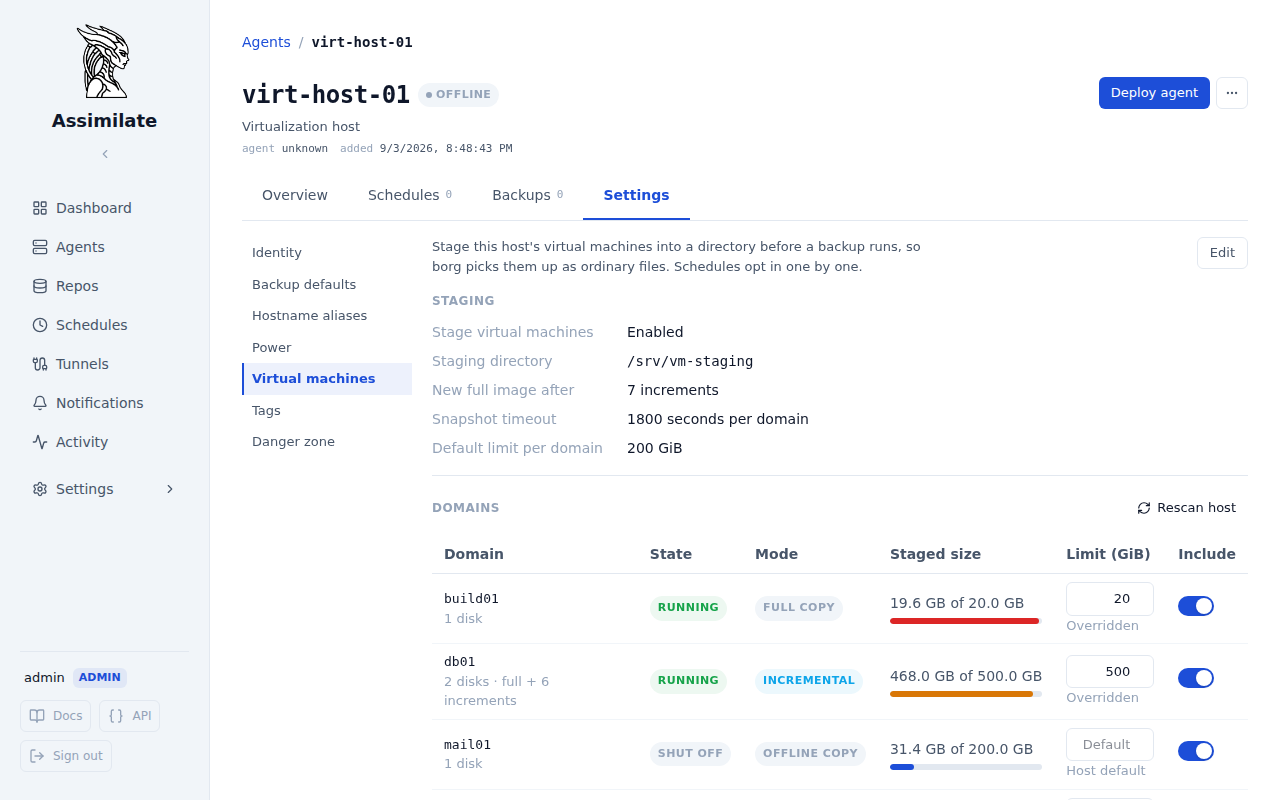
- Turn on Allow schedules to back up virtual machines. This is a permission, not an action: it lets schedules that target this host include its domains, and blocks every schedule while it is off. Nothing is staged until a schedule asks for it.
- Choose which domains to stage. All except excluded backs up every domain on the host and lets you drop individual ones; Only selected backs up nothing until you pick the domains you want. See Choosing which domains to stage.
- Set the staging directory. It must be an absolute path; the agent creates one subdirectory per domain below it. Nothing about this path is assumed anywhere else in Assimilate.
-
Set new full image after (increments per chain), the snapshot timeout per domain, and the default limit per domain.
Set to
N, a chain carriesNincrements before the next run writes a fresh full image. With the default of 7, a domain is captured as one full image and seven increments, then starts again. 5. Click Rescan host. The agent enumerates the domains and reports what it found: their state, how each would be captured, and how much their disks occupy.
Give the QEMU process access to the staging directory first. On distributions where QEMU drops to its own user, the directory must be owned by that user:
mkdir -p /srv/vm-staging
chown qemu:qemu /srv/vm-staging   # libvirt-qemu:kvm on Debian and Ubuntu
chmod 0700 /srv/vm-staging
Confined hosts
SELinux and AppArmor block QEMU from writing outside the paths it knows. On SELinux hosts label the directory with semanage fcontext -a -t virt_image_t "/srv/vm-staging(/.*)?" && restorecon -R /srv/vm-staging. On AppArmor hosts add /srv/vm-staging/** rwk, to /etc/apparmor.d/local/abstractions/libvirt-qemu and reload AppArmor.
Per-domain settings
The domain table lists what the agent last reported, plus the settings you make:
| Column | Meaning |
|---|---|
| Domain | libvirt domain name, its disks and the length of its current chain |
| State | Run state at the last scan |
| Mode | How the domain is captured, decided by the agent from its state and disk formats |
| Staged size | What the domain occupies now, against the limit that applies to it |
| Limit | This domain's own budget in GiB. Empty inherits the host's default |
| Backed up | Whether the domain is staged at all, read in whichever direction which domains is set to |
Removing a domain from the host drops it from the table, unless you gave it settings, in which case it stays with an unknown state so your settings are not lost.
Snapshot a domain now
Click Snapshot on a domain's row to stage it right now, without waiting for a schedule. This runs the same capture a backup's staging phase would - a full image, an increment, or a fallback copy, whichever mode_for currently decides for that domain - against the same staging directory a schedule uses, so the two cannot write over one another: a manual snapshot waits for a scheduled run that is already staging the host, and a schedule that starts afterwards waits for the manual one to finish.
Snapshot is disabled for a domain that is not backed up. Turn it on with the Backed up switch first - staging a domain nobody asked to have backed up would not have anywhere to be picked up from.
The button reports how long the run took, then updates the domain's row with the fresh staged size and chain length, the same way the row changes after a scheduled backup stages it. A failure - the disks no longer fit the domain's limit, libvirt refuses the snapshot, the domain vanished since the last scan - is reported against the row rather than the button, so it reads the same as a failure a schedule's run would have produced.
Choosing which domains to stage
Which domains decides what the Backed up switch means, and what happens to a machine nobody has decided about:
| Mode | Backed up switch | A domain created after the last scan |
|---|---|---|
| All except excluded | Turn a domain off to leave it out of the backup | Staged, rather than silently missed |
| Only selected | Turn a domain on to back it up | Left alone until you select it |
All except excluded is the default, and is what you want when the host exists to run production machines and a new one should be protected the moment it appears. Switch to Only selected when most of the host is scratch — build agents, test machines, throwaway clones — and only a handful of domains are worth the storage.
Switching modes never changes a decision you already made: a domain you turned off stays off, and one you turned on stays on. Only the domains you have not touched move, which is the entire difference between the two.
Giving a domain a limit is not a decision about staging. Under Only selected a domain with a limit but no Backed up switch is still left alone, so setting a budget ahead of time does not quietly pull a machine into the backup.
How a domain is captured
flowchart TD
    A[Domain] --> B{Running?}
    B -- No --> C[Copy each disk<br/>skip unchanged disks]
    B -- Yes --> D{backup-begin and<br/>all disks qcow2?}
    D -- No --> E[External snapshot,<br/>copy, blockcommit]
    D -- Yes --> F{Checkpoint present and<br/>below the full interval?}
    F -- No --> G[Full image<br/>plus a new checkpoint]
    F -- Yes --> H[Increment<br/>plus a new checkpoint]
Every mode also writes domain.xml (the persistent domain definition) and, for UEFI domains, nvram.fd. chain.txt records which files belong to the current chain, in the order they must be merged to restore the domain.
A directory after four runs of a qcow2 domain and one run of a shut off domain:
/srv/vm-staging/
├── web01
│   ├── chain.txt
│   ├── domain.xml
│   ├── vda.20260902T020112123Z.qcow2
│   ├── vda.20260903T020049881Z.qcow2
│   ├── vda.20260904T020207457Z.qcow2
│   └── vda.full.qcow2
└── build01
    ├── chain.txt
    ├── domain.xml
    └── vda.img
Let a schedule stage them
On the schedule, open Settings → Advanced and turn on Back up virtual machines. The staging directory joins that schedule's sources automatically, so it never has to be listed by hand.
Both switches are required, and they answer different questions. The host's switch says whether its domains may be backed up at all; the schedule's says whether this particular run includes them. A schedule that asks for virtual machines on a host that does not allow them backs up no domains at all - which is what lets one host serve schedules that want the virtual machines and schedules that do not.
Staging runs before borg create. A domain that cannot be staged fails the run and the reason is reported against the schedule, because an archive that quietly holds last night's image is worse than a run you are told about.
Storage limits
A limit caps what one domain may occupy below the staging directory, counted as allocated blocks rather than apparent size. The host's default limit per domain applies unless the domain carries its own. Zero means no limit.
The limit is enforced at three points:
- Before an increment. When the chain plus the expected next increment would cross the limit, the run writes a new full image instead. The domain then falls back to a single image and the space the chain held is reclaimed.
- Before a full image. A full image that cannot fit is refused before anything is deleted or written, so the previous chain stays restorable. The domain's row shows why.
- After the run. The directory is measured again. An overshoot fails the domain, because the estimate in step 1 can only ever be a guess.
A new image is written alongside the chain it replaces, and the old one is only deleted once the new one is complete. A run that fails partway - a snapshot libvirt refuses, a stalled copy, a host losing power - therefore leaves the previous backup restorable rather than nothing at all. The cost is that a domain transiently occupies both while the run is in flight, so it can exceed its limit for the duration. Step 3 measures the resting state, once the old chain is gone, and that is the figure the limit governs.
Free space during a run
Size the host's filesystem for a domain's peak, not its limit: while a full image or a copy is being written, that domain needs room for the new one and the old one at the same time.
A domain whose disks alone are larger than its limit can never be staged, and every run says so. Raise its limit, or lower the full-image interval so the chain stays shorter.
Note
The limit governs the staging directory on the host, not the borg repository. Use Storage Quotas to bound what a repository may consume. Borg deduplicates the full images across runs, so the repository grows by roughly the size of the increments even though a full image is rewritten every few runs.
Restore a domain
Restoring happens in two stages, in the order they actually occur: borg puts the staged files back on disk, then the agent builds a domain out of them. Open the agent's Virtual machines section and click Restore on the domain's row.
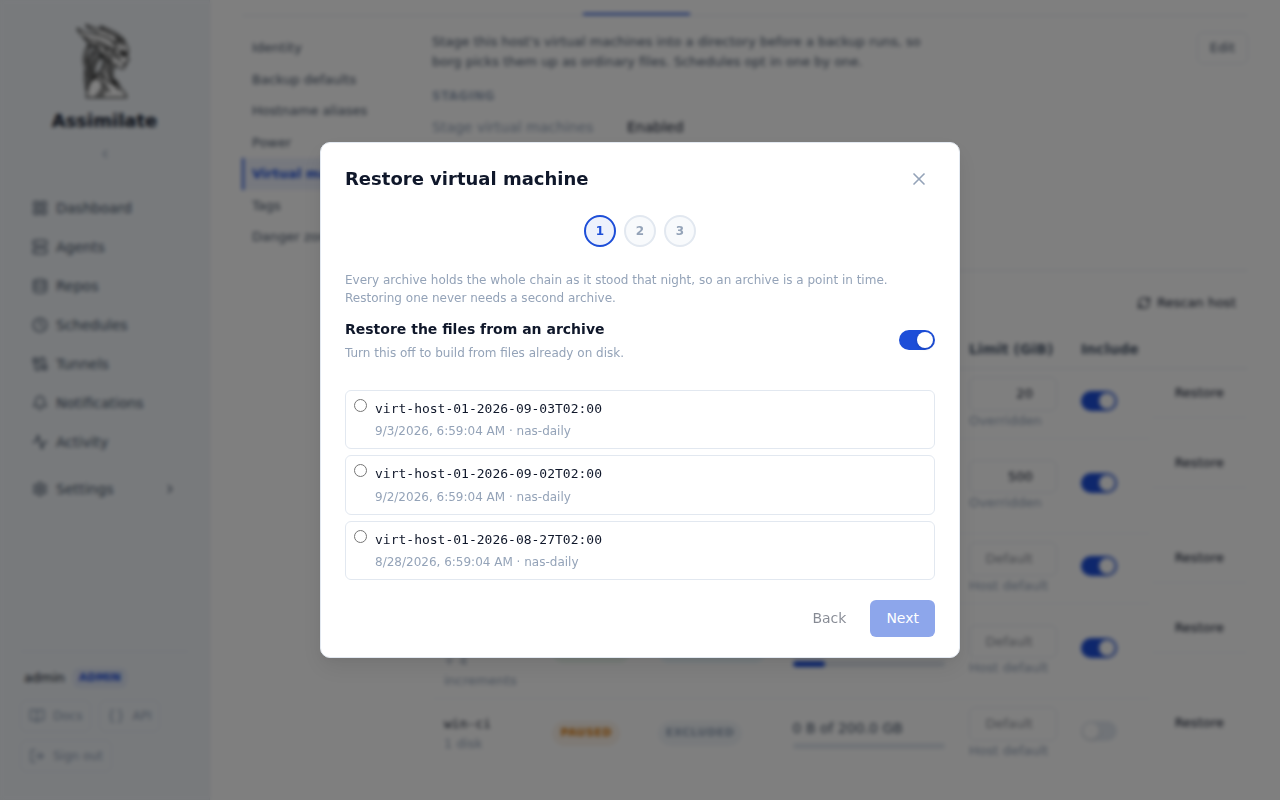
- Which point in time. Every archive holds the whole chain as it stood that night, so an archive is a point in time and restoring one never needs a second archive. Turn off Restore the files from an archive to build from files that are already on disk.
- Where the files land. This is the ordinary agent-side restore:
borg extractruns on the host and no data passes through the server. The files land under the staging path they were archived with, and the wizard shows the exact directory. Stage two reads that directory and leaves it alone, so a failed build can be retried without fetching from borg again. - What to build. A name for the restored domain (defaulted to
<domain>-restored, so it can be defined beside the one it came from), the image directory, and what to do once the images are in place: leave the images only, define the domain shut off, or define and start it.
The build merges each disk's chain in the order chain.txt records, moves the merged image into the image directory as <name>-<target>.<format>, and defines the domain from the restored definition with its disk paths rewritten. The definition keeps everything else the machine had, including its MAC address, and loses its UUID so libvirt issues a fresh one.
Two machines, one MAC
A restored domain keeps the MAC address of the domain it came from. Starting both at once puts two machines with the same MAC on the network. Restore shut off unless the original is gone.
Build from files restored earlier
The second stage stands on its own: it reads any directory holding a staged domain (chain.txt, the images and domain.xml), however those files got there. Restore them with the file restore or from a copy you already have, then run the wizard with Restore the files from an archive switched off and point it at the directory.
By hand
The wizard does what an operator would do with qemu-img. To do it by hand, restore the domain's directory and then, in the order chain.txt lists them for that disk, oldest increment first:
cd <restored>/web01
qemu-img rebase -u -F qcow2 -b vda.full.qcow2 vda.20260902T020112123Z.qcow2
qemu-img commit vda.20260902T020112123Z.qcow2
qemu-img rebase -u -F qcow2 -b vda.full.qcow2 vda.20260903T020049881Z.qcow2
qemu-img commit vda.20260903T020049881Z.qcow2
vda.full.qcow2 now holds the state of the last merged increment. Copy it to the image directory, edit the domain name and disk paths in domain.xml, then virsh define domain.xml.
Restore the whole chain
An increment is only usable together with its full image and every increment before it. Restore the complete directory for the point in time you want, not a single file. Merging rewrites the full image, so always work on the restored copy, never on the staging directory of a live host.
Two schedules on one host
The settings live on the host, so more than one schedule may back it up and each may opt in to staging. Those runs go to different repositories and are otherwise free to overlap - a manual Run now during a scheduled run, two cron expressions that collide, or a catch-up after the agent was down.
Staging is serialised per staging directory, so the second run waits for the first rather than writing over it. The wait counts against that backup's own duration, and the second run usually finds the chain already fresh and writes a small increment or skips the domain entirely.
Cancelling a backup does not release the directory immediately. The agent asks the running virsh or qemu-img to stop and gives it time to do so before forcing it, and the directory stays held until then - otherwise a retry started straight after the cancellation would write into a directory the previous copy had not finished with. A backup cancelled mid-staging therefore blocks the next one for up to that grace period.
Caveats
- Checkpoints live in libvirt, the chain lives in the staging directory. Deleting the staging directory by hand leaves stale checkpoints behind; the next run notices the missing
chain.txt, drops those checkpoints and writes a new full image. - Domains that fall back to copies are captured crash consistent unless the QEMU guest agent is installed, in which case the file systems are frozen for the snapshot.
- A domain killed by the snapshot timeout during a fallback copy keeps running on the snapshot overlay. Commit it manually with
virsh blockcommit <domain> <target> --active --pivot --wait. - An incremental backup that passes the timeout is aborted with
virsh domjobabort, so the libvirt job does not outlive the run that started it. The checkpoint that job was creating may or may not exist afterwards; either way the next run sees the chain it expects is incomplete and writes a new full image.