Storage Quotas
Storage quotas let you set warning and critical deduplicated storage thresholds per repository. Each threshold has its own configurable action: send a notification only, block all backups for the repository, or disable just the schedule that pushed the repository over the limit.
Storage quota configuration lives on the repository detail page, under Settings → Storage quota.
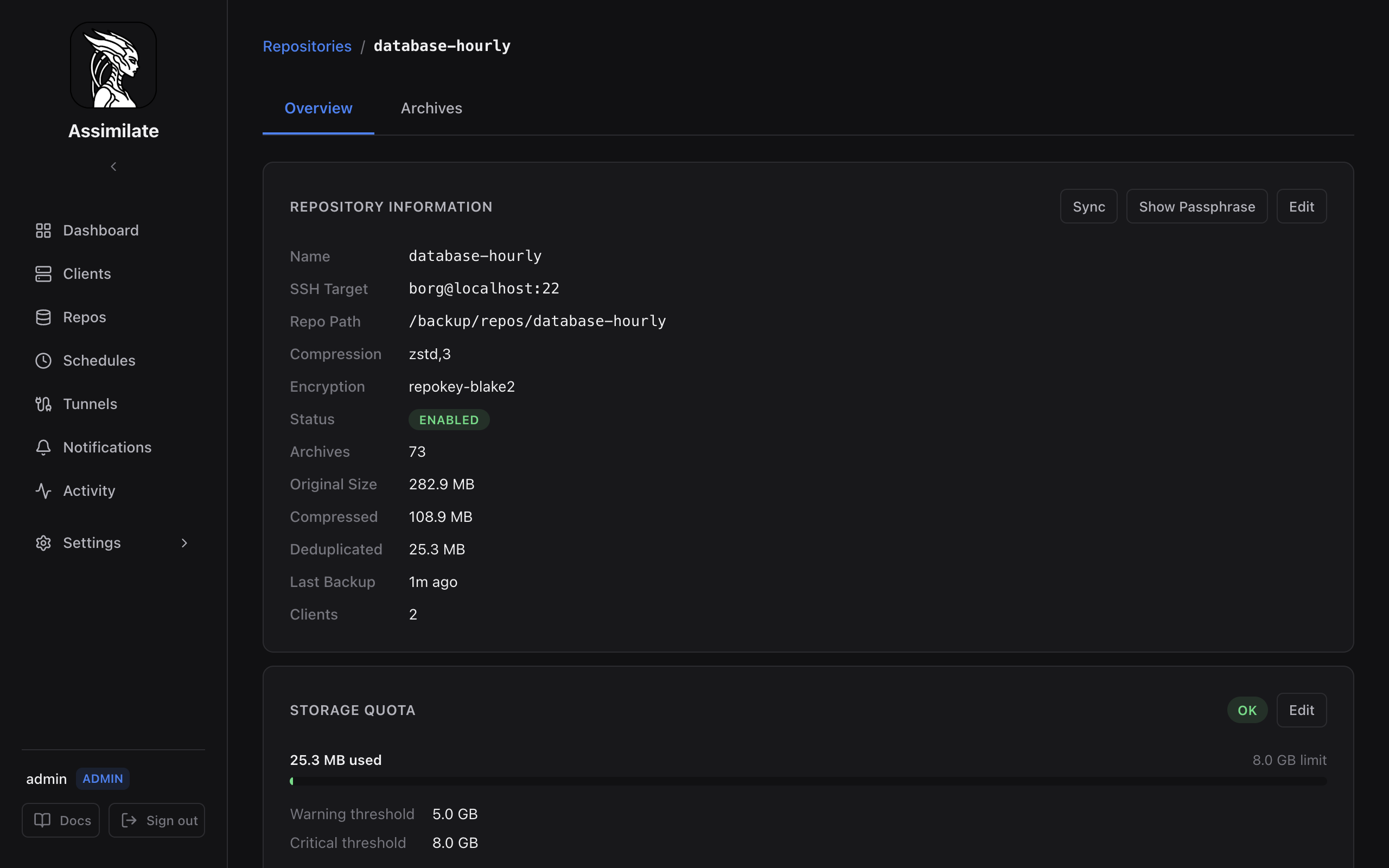
Configuring a Quota
- Navigate to Repos and select the repository.
- In the Storage Quota panel, click Configure Quota (or Edit if one already exists).
- Enter the Warning and Critical thresholds in GB.
- Choose the action for each threshold (see Actions).
- Toggle Enabled and click Save.
Quota Options
| Field | Default | Description |
|---|---|---|
| Enabled | true |
Toggle quota enforcement on or off |
| Warning threshold | — | Deduplicated size at which the warning action fires |
| Warning action | notify_only |
Action taken when the warning threshold is reached |
| Critical threshold | — | Deduplicated size at which the critical action fires |
| Critical action | notify_only |
Action taken when the critical threshold is reached |
Actions
| Action | Behaviour |
|---|---|
notify_only |
Send a notification; all schedules keep running normally |
block_backups |
Disable every schedule for this repository, in addition to notifying |
disable_schedule |
Disable only the schedule whose backup triggered the breach, in addition to notifying |
Disabling a schedule pushes an updated configuration to every agent assigned to it, so the agent stops running that schedule immediately rather than waiting for its next check-in. A disabled schedule can be re-enabled at any time from the Scheduling page.
Tip
Use disable_schedule for a targeted response when several schedules feed the same repository, and reserve block_backups for repositories where any further growth is unacceptable.
Quota Enforcement Flow
Quota status is evaluated after each backup completes, using the repository's current deduplicated size:
flowchart TD
    Complete["Backup completes"] --> Check["Evaluate repo size vs quota"]
    Check --> Ok["Under warning threshold"] --> Done["No action"]
    Check --> Warn["At/above warning threshold"]
    Check --> Crit["At/above critical threshold"]
    Warn --> WarnNotify["Send warning notification"]
    Crit --> CritNotify["Send critical notification"]
    WarnNotify --> WarnAction{"Warning action"}
    CritNotify --> CritAction{"Critical action"}
    WarnAction --> WNotifyOnly["notify_only: no further action"]
    WarnAction --> WBlock["block_backups: disable all schedules for repo"]
    WarnAction --> WDisable["disable_schedule: disable triggering schedule"]
    CritAction --> CNotifyOnly["notify_only: no further action"]
    CritAction --> CBlock["block_backups: disable all schedules for repo"]
    CritAction --> CDisable["disable_schedule: disable triggering schedule"]
Because enforcement runs after the triggering backup has already completed, the backup that crosses the threshold is never itself blocked — only subsequent runs of the affected schedule(s) are stopped.
Server Quotas
When several repositories share the same SSH host — for example, multiple repos backed by one disk on the same storage server — a per-repository quota can't see the combined usage. Server Quotas solve this by applying a single warning/critical threshold (with the same three actions) across every repository on a shared host.
Viewing Current Usage
The repository detail page shows current deduplicated size alongside the configured quota thresholds and a progress bar indicating percentage used.
The Repositories list page shows the same usage bar on any repository card with a quota configured, and its At risk / No quota filter chips make it quick to find repositories that need attention across the whole list. Group by host additionally shows each repository's own quota alongside its share of any server quota on the same host.
The Dashboard Storage Breakdown chart also reflects per-repository size, making it easy to identify repositories approaching their quota.
Removing a Quota
Set Enabled to off and click Save to stop enforcement while keeping the configured thresholds.
Related Pages
- Repository Management — configure repositories
- Server Quotas — shared storage limits across repositories on the same host
- Scheduling & Retention — re-enable a schedule disabled by a quota action
- Dashboard — storage overview across all repositories
- Notifications — configure quota alert notifications