Repository Hosts
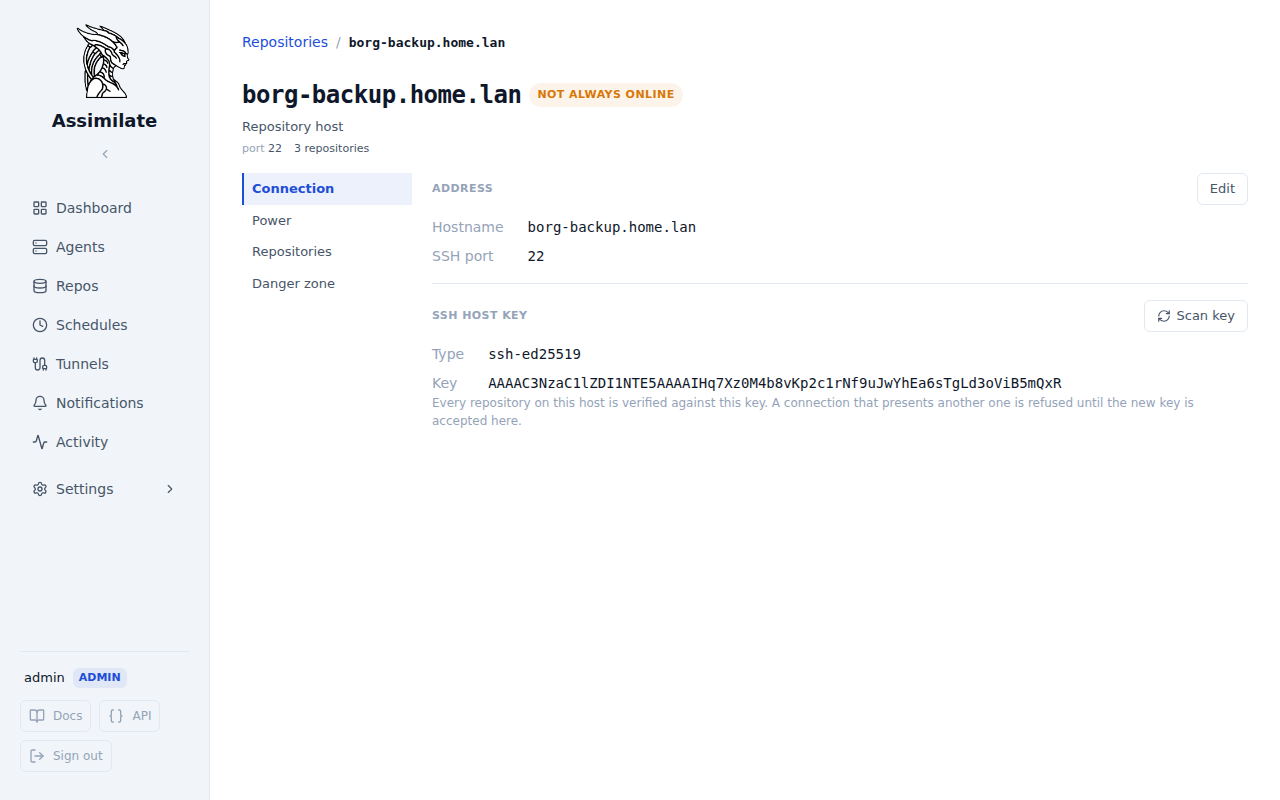
A repository host is the machine borg writes to: one hostname, one SSH port and one pinned SSH host key. Everything that is a fact about that machine rather than about one repository on it is set once, on the host, for every repository it holds: where it is reached, the key it presents, how it is woken and shut down, and whether it is expected to be online. A repository keeps what is really its own: the SSH user it logs in as and its path.
Prerequisites
- At least one repository. A host is created the first time a repository names its hostname, and there is no separate step to add one.
- Admin access. The host page, and every endpoint behind it, is admin-only: its repository list names every repository on the machine, whoever may see which.
Opening a Host
Open a host from either of these:
- The Host row of a repository's Settings → Repository pane.
- The host header of the grouped Repositories list. A host marked as not always online carries a Not always online badge there. With Group by host off, each repository card on such a host carries a host sleeps pill instead.
The page has four sections:
| Section | Content |
|---|---|
| Connection | Hostname, SSH port and the pinned SSH host key |
| Power | Wake-on-LAN, shutting down after a backup, and when the host is offline |
| Repositories | Every repository on the host, with the user and path each one uses |
| Danger zone | Remove host, available once no repository uses it |
Connection
Hostname and SSH port say where every repository on the host is reached. A host has exactly one port. A repository that names a known hostname with another port is refused, rather than silently pointed at a different SSH daemon.
Changing either value moves every repository on the host at once. Each one is marked for relocation, so borg accepts the new location on its next backup, and the host's server quota follows the new name. If the new name already has a quota of its own while the host has one too, the change is refused until one of them is removed on the Server Quotas page, so neither stops applying unnoticed.
SSH Host Key
The pinned key is what every repository on the host is verified against. A connection that presents another key is refused until the new key is accepted here.
- Open the host's Connection section. The page scans the key the host presents now. If it differs from the pinned one, a warning with Review key appears. A repository's own Settings → Repository pane shows the same warning, with a link here.
- Select Review key (or Scan key to check on demand) and compare the key with the one the machine reports locally, for example with
ssh-keygen -lf /etc/ssh/ssh_host_ed25519_key.pub. - Select Accept key. The key is pinned for every repository on the host, and the agents that write to them receive it with their next config push.
A failed scan is not treated as a changed key: the host may simply be asleep.
Adding a repository on a host that already has a pinned key requires the host to present that same key. A different key is refused rather than pinned over the old one, because that would silently re-trust every other repository on the machine.
Power
Waking, shutting down and availability are set on the host and apply to every repository on it. See Power Management for each setting.
A run that writes to several repositories on one host wakes it once, and shuts it down only after the last of those repositories is done.
A repository's own Settings → Power pane shows its host's settings read-only, with a link to the host to change them. It also lists the schedules currently waiting on that repository.
Upgrading from Per-Repository Settings
Before repository hosts existed, every repository carried its own copy of these settings. The schema migration groups existing repositories into hosts once:
- Group. Repositories that pinned the same host key on the same port form one host, whatever hostname each used (
nas,nas.lan, an IP address). A matching key proves it is the same SSH server. Repositories with no pinned key are grouped by hostname alone. - Name. The host takes the hostname most of its repositories used. A tie goes to the name used by the most recently written repository.
- Fold settings. Each setting takes the value that changes nothing for the worse for any repository on the host:
| Setting | When repositories on one host disagree |
|---|---|
| SSH port | The port most of the host's repositories use |
| SSH host key | The key most repositories on that port pinned; a tie goes to the key of the most recently written repository |
| Wake host before backup | On if any repository had it on |
| MAC and broadcast address | From the newest repository that wakes the host |
| Wait for host | The longest timeout |
| Shut down host after backup | Off unless every repository had it on |
| Host is not always online | On if any repository had it on |
| Re-check every | The shortest interval |
| Stop waiting after | The longest window, with "wait indefinitely" winning |
| Server quota | A quota set on a name that lost the vote moves to the host when the host has none; otherwise it is removed |
Everything the migration could not decide without changing where or how a repository connects is written to the Activity Log as a Repo Host Migrated event, naming the repository: a new hostname, another port, a different pinned key or wake address, a key it is now verified against where it had none pinned, or a removed quota.
Check the Activity Log after upgrading
Borg connects from the agent, not from the server, so a hostname the migration chose may not resolve from every agent. That repository's next backup fails with a connection error. Edit the host's hostname to one every agent can resolve.
API Endpoints
| Method | Path | Description |
|---|---|---|
GET |
/api/repo-hosts |
List every repository host with its repositories |
GET |
/api/repo-hosts/{repo_host_id} |
Get one repository host |
PUT |
/api/repo-hosts/{repo_host_id} |
Change the hostname and SSH port |
DELETE |
/api/repo-hosts/{repo_host_id} |
Remove a host no repository uses |
PUT |
/api/repo-hosts/{repo_host_id}/power |
Set the Wake-on-LAN and shutdown settings |
GET / PUT |
/api/repo-hosts/{repo_host_id}/availability |
Get or set whether the host is not always online, and list the schedules waiting on it |
POST |
/api/repo-hosts/{repo_host_id}/availability/check |
Ask the host whether it is back now |
POST |
/api/repo-hosts/{repo_host_id}/ssh-host-key/scan |
Scan the key the host presents |
POST |
/api/repo-hosts/{repo_host_id}/ssh-host-key |
Pin a key for every repository on the host |